
What Is a Proxy? How It Works and a Beginner's Guide to Using Proxies
What is a proxy, how does it work, and what is it used for? Learn about common types of proxies, how to use them, and how to choose the right one for beginners.
What is a proxy, how does it work, and what is it used for? Learn about common types of proxies, how to use them, and how to choose the right one for beginners.
When you access the Internet, your device usually connects directly to a website via an IP address. However, with a Proxy, this connection will go through an intermediate server before reaching the target website.
Proxies are used in a variety of scenarios, such as changing the displayed IP address, controlling connections, accessing region-locked content, or supporting the management of multiple online work environments.
What is a Proxy, how does it work, and how should beginners use a Proxy?
Start your free InviBrowser experienceto set up proxies, create multiple browser profiles, and manage work environments more efficiently all on a single platform.
What is a proxy?
A proxy, or proxy server, is an intermediary server that sits between a user's device and a website or service on the Internet.
Instead of the device sending requests directly to the website, the requests will first be routed through a Proxy.
A simple way to visualize this: Your device → Proxy Server → Website
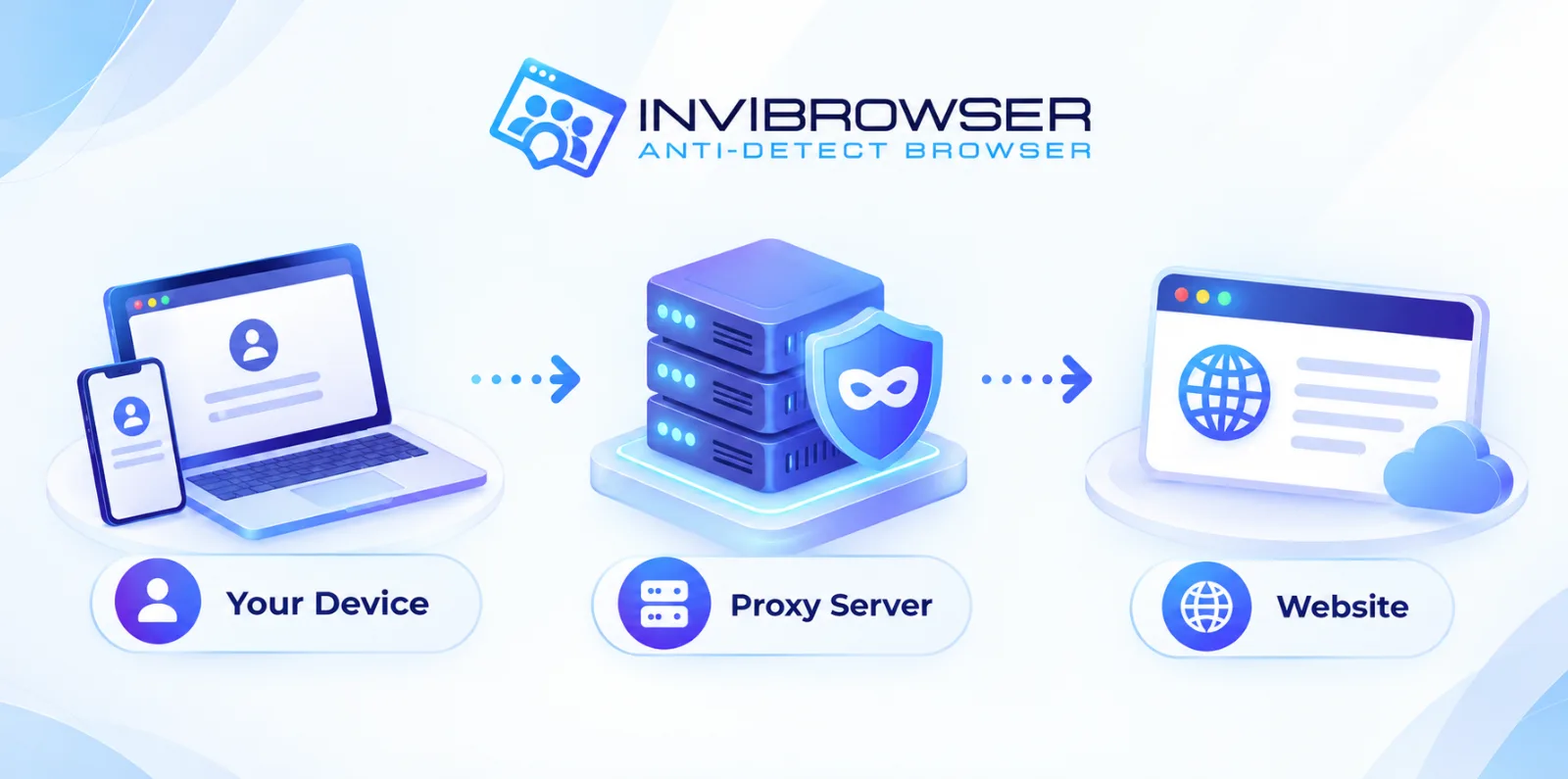
The proxy receives requests from the device, forwards those requests to the website, then receives the response data and sends it back to the user.
During this process, the website typically sees the proxy's IP address instead of the user's original connection IP address.
How does a proxy work?
The operation of a Proxy can be divided into 4 steps:
-
The user sends a request to access a website.
-
The request is being forwarded to the Proxy Server.
-
The proxy sends requests to the website using its own IP address.
-
The website returns data to the Proxy, which then forwards the data to the user's device.
Example:
You are located in Vietnam but are connecting via a Proxy with an IP address based in Singapore. When you access a website, the website will detect the connection as coming from the Singapore IP rather than your original network IP.
However, proxies primarily handle network connections. Other information such as " browser fingerprints"can still be collected by websites through the browser.
What is a proxy used for?
Proxies have a wide range of applications depending on usage requirements.
Change the displayed IP address
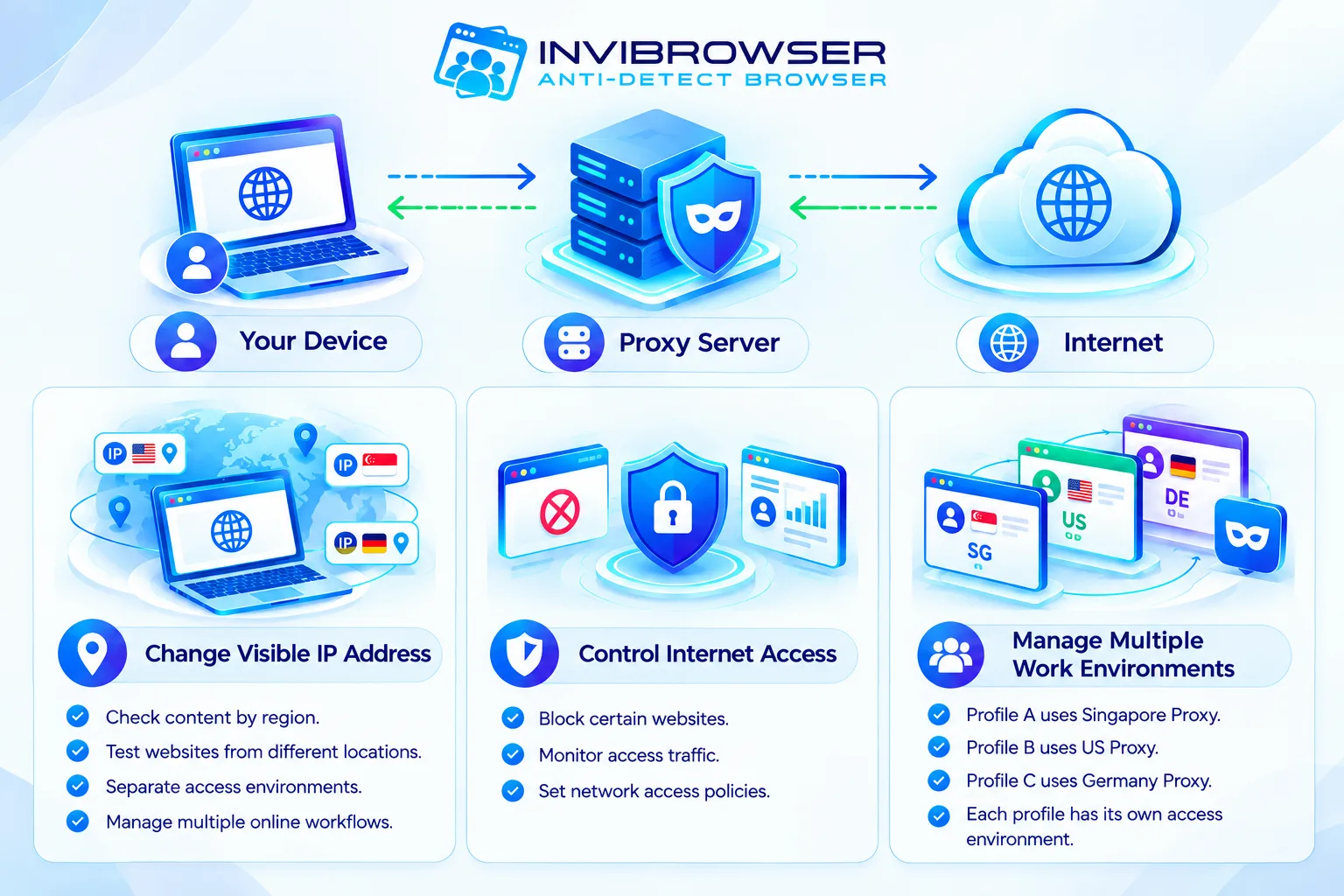
One of the most common functions of a proxy is to change the IP address that websites see.
This can be used in cases such as:
-
Check the content by each area.
-
Test the website from multiple different locations.
-
Isolate access environments.
-
Manage multiple online workflows.
Internet Access Control
Enterprises can use a Proxy to control Internet traffic within their system.
Example:
-
Block certain websites.
-
Monitor traffic.
-
Set up network access policies.
Support management of multiple work environments
For sellers, marketers, or agencies, proxies can be combined with Antidetect Browser to set up a dedicated access environment for each browser profile.
Example:
-
Profile A uses a Singapore proxy.
-
Profile B uses a US proxy.
-
Profile C uses a German proxy.
Each profile can be configured with a separate access environment.
Common Types of Proxies
Proxies can be classified based on IP source, protocol, or usage method.
Residential Proxy
A residential proxy uses an IP address provided by internet service providers to residential users.
This type of proxy is typically used in scenarios where an IP originating from a residential network is required.
Datacenter Proxy
Datacenter proxies use IP addresses from data centers.
Common advantages include faster speeds and lower costs compared to Residential Proxies.
However, IP addresses from datacenters are much easier to identify as belonging to server infrastructure.
Learn more: Residential Proxy vs Datacenter Proxy: How to Choose the Right One for Your Needs
Mobile Proxy
Mobile proxies use IP addresses from mobile networks such as 4G or 5G.
This type of proxy is commonly used when there is a need to simulate an access environment from a mobile device.
Dedicated Proxy and Shared Proxy
A Dedicated Proxy is a proxy that is exclusively assigned to a single user.
A shared proxy can be used by multiple people at the same time.
Dedicated Proxies generally make it easier to track and manage IP usage history, while Shared Proxies come at a lower cost but their IP quality can be more difficult to control.
What are HTTP, HTTPS, and SOCKS5 proxies?
In addition to classification based on IP source, proxies can also be categorized by protocol.
HTTP Proxy
HTTP proxies primarily handle web traffic that uses the HTTP protocol.
HTTPS Proxy
The HTTPS proxy supports HTTPS connections and is suitable for websites that use SSL/TLS encryption.
SOCKS5 Proxy
SOCKS5 is more flexible as it can handle various types of network traffic, not just web traffic.
For beginners, it is important to choose a proxy type that is compatible with the software or browser you are using.
How to Use Proxies for Beginners
The way to use a Proxy depends on the device and software.
Typically, proxy providers will offer the following information:
-
IP address or hostname.
-
Port.
-
Username.
-
Password.
Example:
IP: 192.xxx.xxx.xxx Port: 8000 Username: user123 Password: password123
Users enter this information into the proxy settings of their browser, operating system, or the software they are using.
If using an antidetect browser, each browser profile can be configured with a separate proxy.
After configuration, you should double-check the following:
-
IP address.
-
Country.
-
Time zone.
-
Proxy Status.
-
Connection speed.
How is a proxy different from a VPN?
Both proxies and VPNs can change the IP address visible to websites, but they differ significantly in how they operate and their intended use cases.
| Criteria | Proxy | VPN |
|---|---|---|
| - Change IP | - Yes | - Yes |
| - Scope | - Usually depends on the application or configuration | - Typically applied to all device connections |
| - Connection encryption | - Proxy Type | - Usually have |
| - Multi-IP Management | - Flexible | - Limit |
Are proxies safe?
Proxies are not inherently secure or insecure. Their level of security depends on:
-
Proxy Provider.
-
IP Source.
-
Protocol used.
-
Log Retention Policy.
-
How to configure.
Free proxies of unknown origin may carry potential security and privacy risks.
In addition, proxies do not make users completely anonymous. Websites can still use cookies, sessions, or "Browser Fingerprint" to identify the access environment.
Why are proxies often used in conjunction with antidetect browsers?
Proxies and antidetect browsers address two distinct layers of information.
Proxy mainly handles IP addresses and connection routing.
Antidetect Browser focuses on browser environments such as:
-
Cookie.
-
Session.
-
User Agent.
-
Canvas.
-
WebGL.
-
Browser fingerprinting.
When combining these features, users can assign a dedicated proxy to each browser profile.
Learn more about the differences between Cookies, Sessions, and Browser Profiles to understand how browser data is stored and managed. When combined, users can assign a separate proxy to each browser profile.
Example:
| Profile | Proxy | Purpose |
|---|---|---|
| - Profile 1 | - IP Singapore | - Project A |
| - Profile 2 | - US IP | - Project B |
| - Profile 3 | - German IP | - Project C |
This organizational approach makes the management of multiple work environments more transparent.
How to Choose the Right Proxy
When choosing a Proxy, the following factors should be considered.
IP Type
Determine whether you need to use Residential, Datacenter, or Mobile Proxy.
IP Location
Select the country or region that matches your intended use.
Dedicated hay Shared
If you need better control over your IP usage history, a Dedicated Proxy is usually more suitable.
Speed and Stability
Proxies with low speeds or frequent connection drops can directly disrupt work processes.
IP Reputation
Another important factor is IP Reputation
IP addresses that have previously been used for spam or other suspicious activities may have a low trust score on some systems.
Therefore, one should not only focus on the price of proxies while ignoring their quality and IP history.
Managing Proxies and Browser Profiles with InviBrowser
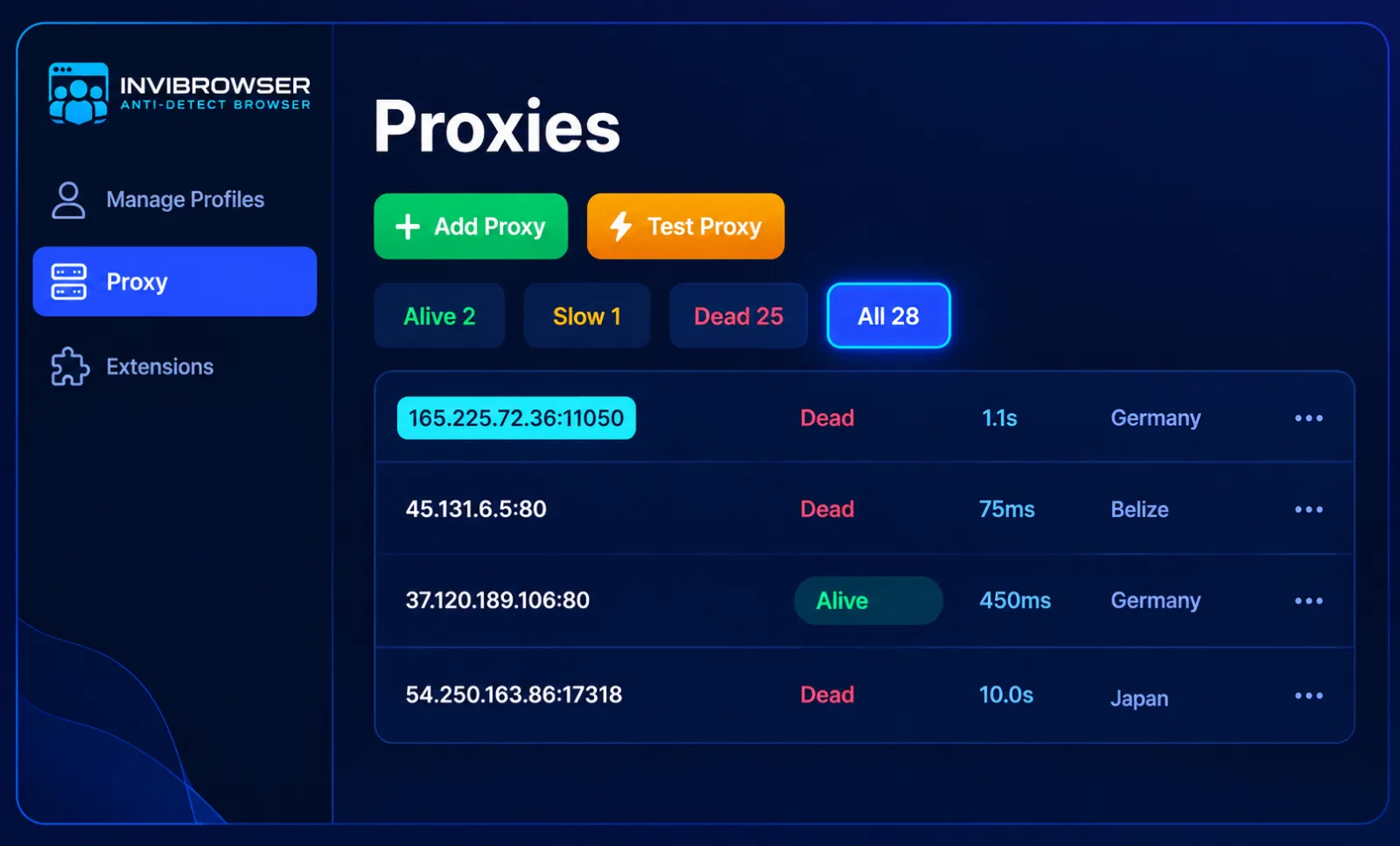
When operating multiple accounts or multiple projects, managing a large number of proxies manually can become complicated.
InviBrowser supports creating and managing multiple independent browser profiles, and allows configuring proxies on a per-profile basis.
Some features that support the operation process include:
-
Create multiple browser profiles.
-
Set up proxy for each profile.
-
Separate cookies and sessions.
-
Manage profiles by group.
-
Member permissions.
-
Supports multi-account operation workflows.
As a result, each project can be hosted within its own dedicated browser environment and connection.
Start your free InviBrowser experience to set up proxies, create multiple browser profiles, and manage work environments more efficiently all on a single platform.
Proxy FAQ
Does a proxy change your IP address?
Yes. When connecting via a Proxy, websites typically see the Proxy's IP address instead of the original connection IP address.
Is a proxy the same as a VPN?
Not exactly. A proxy primarily acts as an intermediary server, while a VPN typically encrypts and routes all of a device's network traffic.
Can a proxy provide complete anonymity?
No. A proxy is only part of the access environment. Websites can still use cookies, sessions, or browser fingerprinting to identify users.
What is the difference between Residential Proxy and Datacenter Proxy?
Residential proxies use IP addresses assigned to residential internet connections, while datacenter proxies use IP addresses originating from data centers.
Can one proxy be used for multiple accounts?
Technically, this is possible, but using the same Proxy for multiple accounts will cause those accounts to share the same IP address. The choice of usage method should align with the workflow and policies of each respective platform.
Do You Need a Proxy for an Antidetect Browser?
It is not mandatory in all cases. However, when there is a need to separate access environments by individual browser profiles, proxies are often used in conjunction with Antidetect Browsers.
Conclusion
Through the above article, you may have understood what a Proxy is, how Proxies work, common types of Proxies, as well as how to use Proxies for beginners.
Proxies can help change the displayed IP address and build separate access environments. However, proxies are not a complete replacement for other browser environment management or connection security solutions.
If you need to manage multiple proxies along with multiple browser profiles on a single device, InviBrowser supports creating independent browser profiles, configuring proxy settings for each individual profile, and managing workflows by group.
See also:
You can try InviBrowser for freeto start managing browser profiles and proxies more conveniently.